
Business account guide
Till, stock, reports, staff: everything, with pictures. To read, listen to or as PDF.
Open the service1. The Business account
What it is for
Run your shop from your phone: till, stock, customers, invoices, reports, staff.
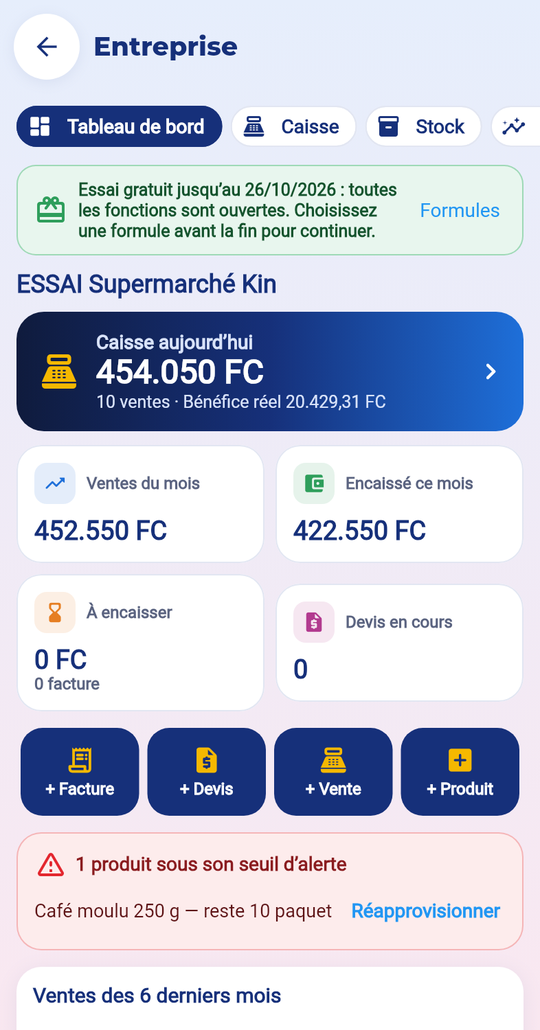
The steps
- Open Services → Business.
- Tap “Start the free trial”, fill in your business and tick the terms.
- Add your products (or import them from Excel).
- Add your staff with a PIN.
- Open the till and sell.
Price
14-day free trial, once per person. Then three plans: Shop, Business, Supermarket (your country’s price shown before paying). This is separate from your account level.
What is kept
Business data is visible only to you and your staff. You can export or delete everything in “Team” → “My data”.
Common mistakes
- Till receipts do not replace your official invoices: the business remains responsible for its taxes.
- Without an active plan at the end of the trial, you can read your data but not create any.
2. The till
What it is for
Sell fast: barcode, quantities, discount, payment, receipt.
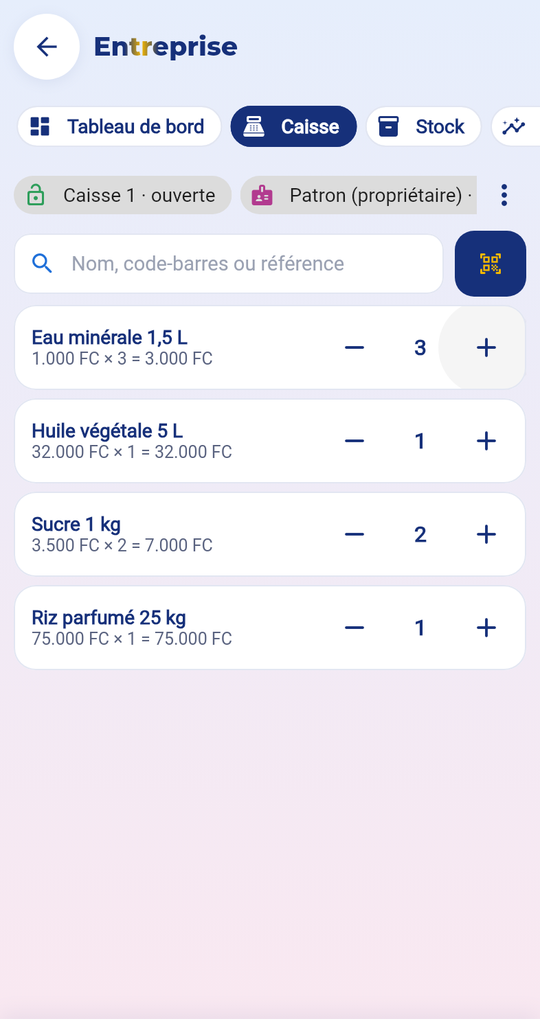
The steps
- Open the till with the money in the drawer at the start.
- Scan the barcode or search for the product; set the quantity with − and +.
- Tap “Checkout”: cash (2 currencies possible), Mobile Money, card or credit.
- The change is shown; the receipt is ready: print (Bluetooth), PDF or WhatsApp.
- In the evening, “Close the till”: count the money and type the total.
Price
Included in your Business plan.
What is kept
Without internet, the sale is kept on the device and sent when the network returns, with no duplicates. Each receipt has a number that follows on and a verification QR code.
Common mistakes
- Discount refused beyond your role’s limit.
- Credit refused if the customer has no limit set by the manager.
- Return or cancellation: the manager’s PIN and a reason are needed.
3. The stock
What it is for
Follow each product: stock in, stock out, alerts, stocktake, suppliers.

The steps
- Tap “New product”: name, selling price, purchase price, barcode (scanned or created), alert threshold, expiry.
- For a delivery: “More” → “Purchase from a supplier”.
- For breakage or loss: open the product → “In / out”.
- Print barcode labels, import or export the list in Excel.
- Do a stocktake: count, the app shows the differences.
Price
Included in your plan (number of products depending on the plan).
What is kept
Each movement is recorded with the date, time, person and reason, and can no longer be changed. The online shop’s stock follows the store’s.
Common mistakes
- Barcode already used: each product must have its own code.
- An out-of-stock product is hidden automatically in the online shop.
4. The reports
What it is for
See what sells and what you really earn.

The steps
- Choose the period: today, 7 days, this month…
- Read revenue, returns, real profit.
- Look at the best-selling and unsold products.
- Check the tills and their differences.
- Export in Excel or PDF.
Price
Daily reports in all plans; week and month with Business; exports with Supermarket.
What is kept
Only the owner and managers see profits and purchase prices.
Common mistakes
- Real profit = sales excluding tax and discounts − purchase price of the items sold.
- A wrongly entered purchase price distorts the profit: check your product cards.
5. Customers and debts
What it is for
Follow your customers’ credit sales and payments.

The steps
- Add a customer (name, WhatsApp).
- The manager sets a credit limit.
- At the till, choose the customer and the “On credit” amount.
- When they pay: open their card → “Collect”.
- Reminder: “WhatsApp reminder” prepares a polite message.
Price
Included in your plan.
What is kept
Each customer’s history (credit purchases, payments, reminders) is kept.
Common mistakes
- Limit 0: cashiers cannot sell on credit to this customer.
- Add the country code to the number for WhatsApp.
6. Team and settings
What it is for
Give everyone the right access; set the currency, tax and discounts.

The steps
- “Staff and PINs”: add a manager, a cashier or a storekeeper with a 4- to 6-digit code.
- Invite a staff member to use their own account (code valid 48 hours).
- “Currency, tax and discounts”: 2nd currency and rate, tax, allowed discount by role.
- “Shared device”: everyone types their PIN before working.
Price
Number of staff and tills depending on the plan.
What is kept
PINs are never stored in clear.
Common mistakes
- Cashier: the till only, without purchase prices or profits.
- Storekeeper: the stock only.
- 5 wrong codes: blocked for 15 minutes.
7. Business plans
What it is for
Choose the plan that matches the size of your shop.
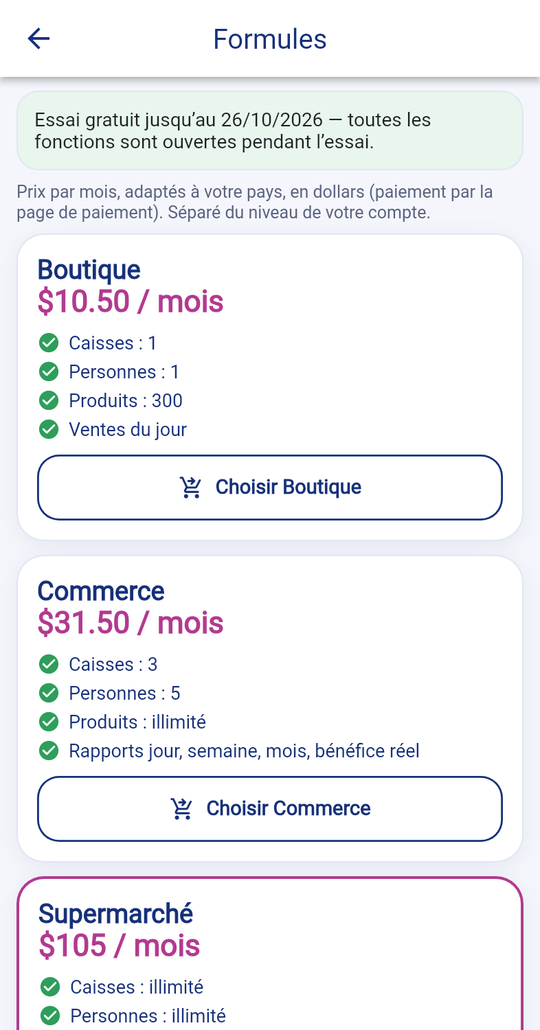
The steps
- Shop: 1 till, 1 person, 300 products.
- Business: 3 tills, 5 people, unlimited products, reports.
- Supermarket: everything unlimited, several stores, transfers, exports.
- Tap “Choose”: the payment page opens.
Price
Monthly prices adapted to your country, in dollars, payment fees included; shown before paying.
What is kept
Changing plans does not delete any data.
Common mistakes
- If a feature is refused, it is not in your plan.